
From Tornado Watch Map to Ready-to-Post Alert in Seconds
A Tornado Watch is in effect. The NWS map is on your screen. You need to get the word out — fast. Here's how SkyDraft turns that official graphic into a complete, publish-ready social post in seconds, using nothing but the image itself.
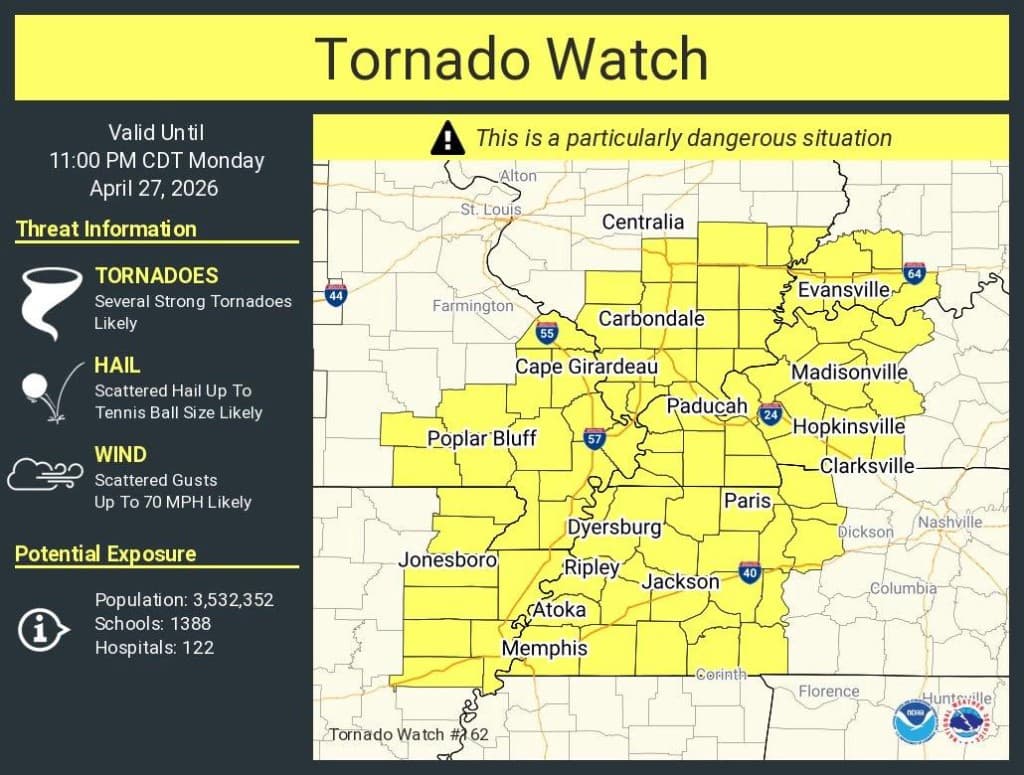
The situation: Tornado Watch #162
The image below is a real NWS Tornado Watch graphic — the kind storm chasers, meteorologists, and weather enthusiasts share dozens of times every severe weather season. It contains critical information:
- Watch type and number (Tornado Watch #162)
- Validity window (until 11:00 PM CDT)
- Threat breakdown: tornadoes, tennis ball-sized hail, 70 MPH wind gusts
- A "Particularly Dangerous Situation" (PDS) designation
- Population exposure: 3.5 million people, 1,388 schools, 122 hospitals
- Affected cities across Illinois, Missouri, Kentucky, Tennessee, and Arkansas
All of that needs to be communicated clearly, quickly, and in a format that works on Twitter, Instagram, and Facebook — without losing the urgency.

What SkyDraft does with it
Instead of manually reading through the graphic and writing a post from scratch, you simply upload the image to SkyDraft's photo analysis method. The AI reads every detail visible in the image — the watch type, the cities listed, the threat levels, the PDS tag, the population numbers — and generates a complete content package:
- Headline — punchy, shareable, appropriate to the severity
- Main post — structured, organized by region, with key facts and a call to action
- Short version — Twitter/X-ready, under 280 characters
- Hashtags — automatically tailored to the event type and location

Breaking down the output
Looking at the result, a few things stand out:
The post is organized by geography
Instead of one overwhelming wall of text, SkyDraft groups the affected cities by cluster, mirroring the way the original watch map divides the affected area. Readers in different regions can immediately find whether they're in the watch area.
The urgency is preserved
The PDS designation, the population at risk, the schools and hospitals — all the details that make this more than a routine watch are included. SkyDraft doesn't flatten the severity.
The short version is Twitter-ready
At 166 out of 280 characters, the short version fits cleanly on Twitter/X with room to spare, hitting the key facts: watch type, timing, main threats, and a call to action.
Hashtags are contextual
#TornadoWatch, #SevereWeather, #CentralUS, #WeatherAlert —
the tags match the event type and geography, not a generic weather template.
Who is this for?
This workflow is built for anyone who regularly communicates severe weather to the public:
- Storm chasers — you're in the field, you screenshot the watch graphic, you post in 10 seconds
- Meteorologists — translate official NWS products into public-friendly language instantly
- Local news teams — get the first social post out before the competition
- Weather enthusiasts — share accurate, well-formatted alerts without writing skills required
Try it yourself
Next time there's a watch, warning, or advisory graphic on your screen, don't spend five minutes writing a post from scratch. Upload it to SkyDraft, pick your platform, and let the AI do the work.
The free plan includes 10 generations per month — no credit card required.
Ready to try SkyDraft?
5 free generations per month. No credit card required.
Create your free account →